Claude Code’s “Don’t Ask Again” Left Secrets in 1,122 Public GitHub Files. Your Agent’s Settings Are Code Now

Passwords and API keys that developers typed into commands they approved in Claude Code now sit in public GitHub repositories, The Hacker News reported on 7 Nov 2026, citing research by security company Apiiro. The article covers what Apiiro found, why agent settings files now need an owner, and how to review them like any other code.
TL;DR
- One click can save a secret in plain text. When a developer picks “Yes, and don’t ask again,” Claude Code can save the exact command, password included, in
.claude/settings.local.json, according to Apiiro’s research as reported by The Hacker News. - Apiiro found 1,122 public copies of the file holding at least one secret. The copies hold 1,379 distinct secrets, more than a third of them database access, though Apiiro did not test whether the credentials still work. One notified company confirmed its key had been live.
- Anthropic says the file is meant to stay local, and scanners still missed some secrets. Boris Cherny of the Claude Code team said the file “is not a file you should check into source control” and that everyone should have secret scanning on, while scanners in Apiiro’s test missed 215 of the 1,122 files.
- Qodo reviews every pull request (PR) when it opens, including changes to agent settings files, against one
REVIEW.mdper repository plus organization-wide custom instructions, and Claude Code resolves Qodo’s findings through Qodo’s Claude Code plugin, so teams merge agent-generated code sooner with fewer rollbacks.
What Apiiro Found in Claude Code’s Settings Files
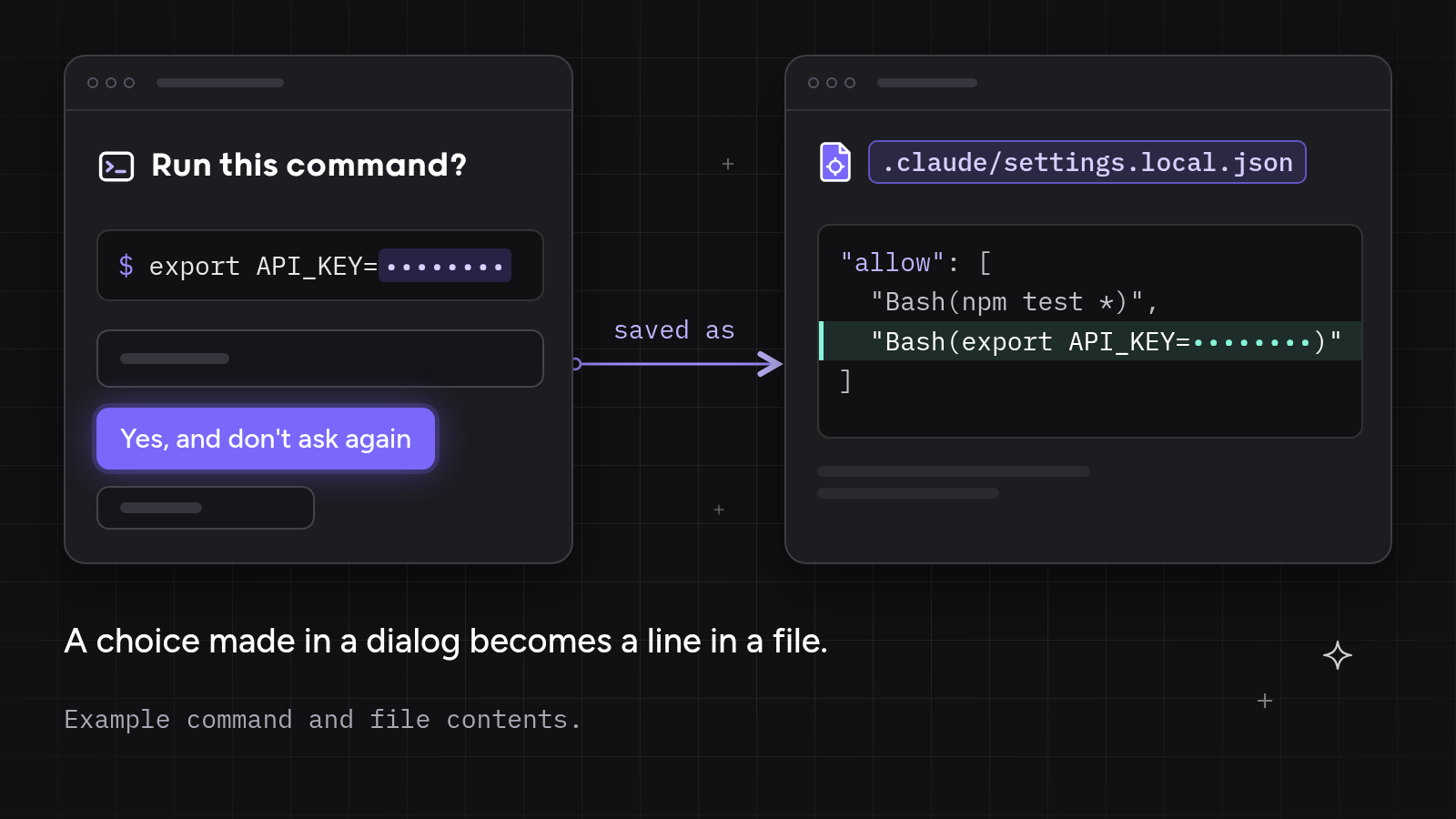
Claude Code asks before it runs most shell commands. A developer who picks “Yes, and don’t ask again” gets an allow rule saved in .claude/settings.local.json inside the project, so matching commands run without asking in later sessions. Sometimes the saved rule is a pattern, such as npm test *. Sometimes the rule is one exact command, and any password or token typed into the command is saved with it, in plain text.
Apiiro searched public GitHub for copies of the file from 1 to 3 Nov 2026 and published its research on 5 Nov 2026, and The Hacker News reported the findings on 7 Nov 2026.
| What was found or reported | Detail | Source |
| Copies of the file on public GitHub | 104,185 copies of .claude/settings.local.json in 103,617 repositories |
Apiiro, via The Hacker News, 7 Nov 2026 |
| Copies holding at least one secret | 1,122 copies (about 1.1%), traced to 1,105 repositories | Apiiro, via The Hacker News, 7 Nov 2026 |
| Distinct secrets | 1,379, including 379 database passwords, 43 SSH logins, 42 GitHub, GitLab and npm tokens and 23 AWS keys | Apiiro, via The Hacker News, 7 Nov 2026 |
| Validity | Not tested; one notified company confirmed its key had been live | Apiiro, via The Hacker News, 7 Nov 2026 |
| Claude as co-author | In 539 of the 1,105 repositories, a commit listing Claude as a co-author changed the file | Apiiro, via The Hacker News, 7 Nov 2026 |
| History and forks | 734 more secrets in older versions across 509 repositories; 211 forks of 74 repositories carry the same secrets | Apiiro, via The Hacker News, 7 Nov 2026 |
| Shared settings file | 298 of 76,011 copies of the shared .claude/settings.json hold secrets |
Apiiro, via The Hacker News, 7 Nov 2026 |
| Secret scanners | gitleaks flagged 564 of the 1,122 files and TruffleHog 643, run without their verification step; neither flagged 215 | Apiiro, via The Hacker News, 7 Nov 2026 |
| Other coding agents | Of 16 agents compared, Claude Code is the only one confirmed to save the full approved command in a project file by default | Apiiro, via The Hacker News, 7 Nov 2026 |
| File age | In half of the repositories with a secret, the file had sat on the default branch for at least 217 days | Apiiro, via The Hacker News, 7 Nov 2026 |
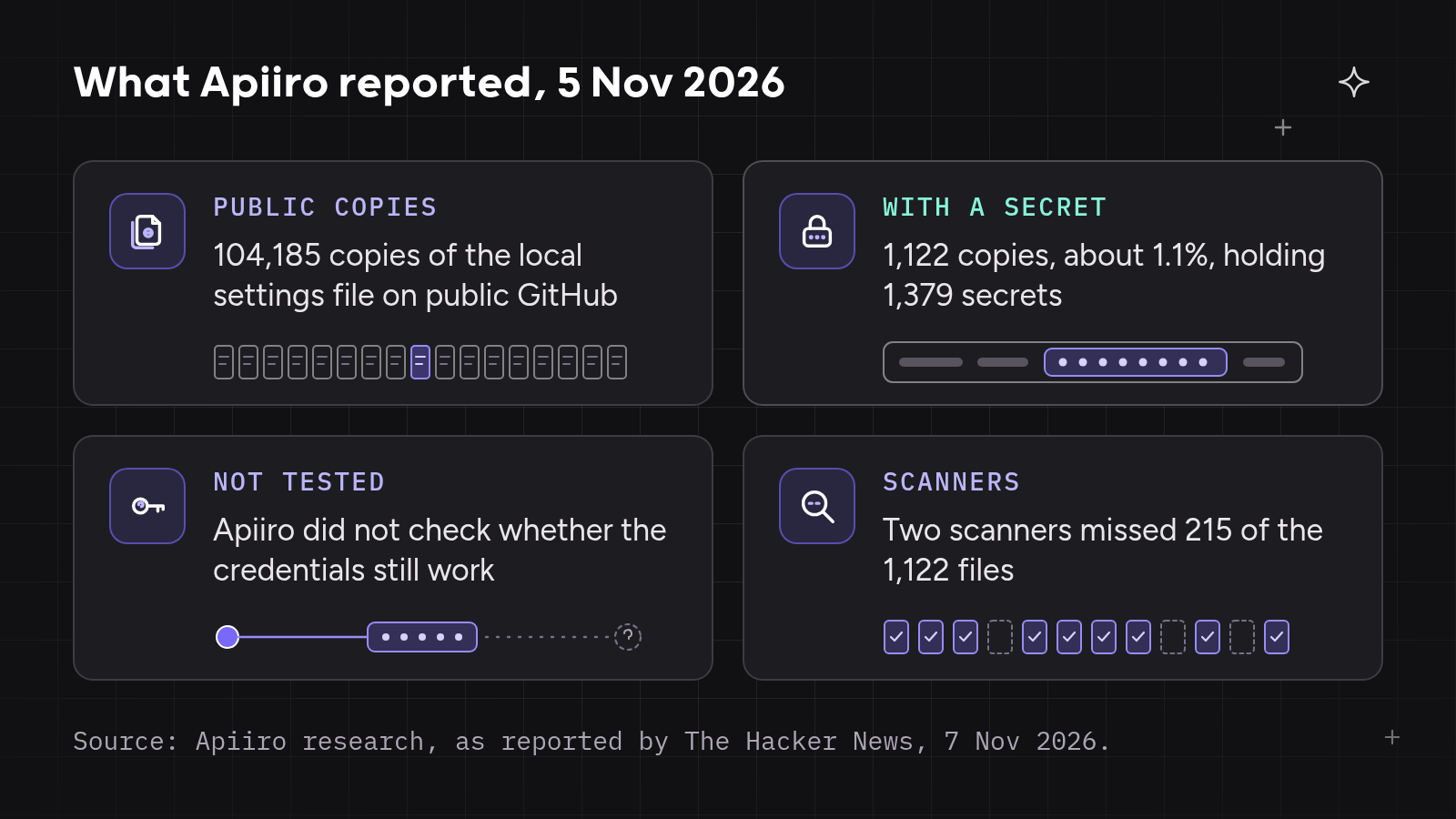
Apiiro counted a value as a secret when it matched a known key format, or when a password or token sat beside the address of a public server, and an AI reviewer had to agree. The secrets were “not confirmed as valid,” LATENT’s analysis of the research noted on 8 Nov 2026. Removing the file does not undo the exposure, because older versions stay in Git history and in forks, so the researchers advise rotating every credential first and cleaning up second.
Anthropic answered on Hacker News on 7 Nov 2026. Claude Code “has not done secret scrubbing (there are many good tools for that), but we are looking into what we can do to prevent this,” Boris Cherny of the Claude Code team wrote. He added that .claude/settings.local.json “is meant to stay local,” that Claude Code adds the file to Git’s ignore list when it creates the file, and that “Regardless of what agent you use, you should have secret scanning enabled.”
Apiiro’s co-author data points the other way on how the files got committed, and Claude Code adds the file only to one computer’s global Git excludes. Neither side disputes the main point. Agent settings files now hold real secrets in real repositories.
Why the Claude Code Finding Matters: Every Agent Wants Fewer Questions
Every coding agent vendor wants developers to approve less, because each prompt costs attention. In a follow-up comment, Cherny wrote that “the threat model here is: human has to approve a lot of commands, so gets tired and accidentally approves a command they shouldn’t have,” and that “in practice the threat model is that human attention is limited.” His answer is Claude Code’s auto mode, which “is enabled by default and is included for free in all plans.”
With fewer prompts, a choice a developer used to make in a dialog now lives in a file, as an allow rule, a permission list, a hook or a saved command. Agent folders such as .claude/, .cursor/, .gemini/ and .specstory/ hold those decisions, and the researchers advise treating them like .env files.
Agent settings and instruction files are usually configured once, never updated and owned by nobody in review. A developer approves a command on a Tuesday, the rule stays for months, and the next person to read the file may be whoever finds it on public GitHub. One commenter on the Hacker News thread put the fix in two sentences. “Review your code before committing. Do code reviews on PRs.”
Every standing approval an agent saves becomes a line in a file that can ship with the code. The cost shows up in four places.
What Breaks When Agent Settings Skip Code Review
- Nobody owns agent settings files. Approvals pile up one click at a time, and no one reads the file as a whole. In half of the repositories with a secret, the file had sat on the default branch for at least 217 days, and Claude Code’s changelog through 8 Nov 2026 shows no redaction fix, according to LATENT.
- Local files reach shared repositories. Claude Code’s protection lives in one developer’s Git settings on one computer. A file created by hand, copied from another project or written on a second machine has no protection, and the VS Code extension can save to the shared
.claude/settings.json, which teams commit on purpose. - Pattern scanners miss passwords inside commands. Scanners look for known key formats, and a password after
PGPASSWORD=,sshpass -pormysql -plooks like an ordinary word in a command line. Neither gitleaks nor TruffleHog flagged 215 of the 1,122 files in Apiiro’s test, run without the tools’ verification step. - Leaders can’t see agent settings changes across repositories. Apiiro traced files to 63 organizations, mostly software companies. Keeping visibility into what code agents create or modify is one of the biggest quality and governance gaps, named by 38.3% of engineering leaders in the Qodo State of AI Code Quality 2026.
All four breaks share one cause. Agent settings change what runs and what ships, yet they skip the review every other changed file gets.
So Are Your Agent’s Settings Code Now?
Agent settings are code. A file that decides which commands an agent runs without asking, and that ships in the same commits as application code, needs the same review as code. Secret scanning stays on, as Cherny and the researchers advise, and code review reads the whole change in context. A review layer for agent settings needs four parts, one for each break.
- A written review instruction that names agent folders and saved commands, so the files get an owner.
- Review on every PR as it opens, so a settings file that slips into a commit gets read before merge.
- Findings raised against that written instruction, with a fix the agent that wrote the change can apply.
- One record for leaders across repositories and PR authors, so they see what was found and what got fixed.
A settings file one developer watches in one repository goes unwatched across 500. The four parts have to work across every repository and Git provider.
How Qodo Reviews Agent Settings Like Code
Qodo, the AI Code Review Platform, is the quality and governance layer for teams moving toward a more autonomous SDLC (software development lifecycle). Qodo answers the four breaks in order, with written review instructions, review on every PR, findings Claude Code can resolve, and analytics for leaders.
REVIEW.md and Custom Instructions Give Agent Settings an Owner
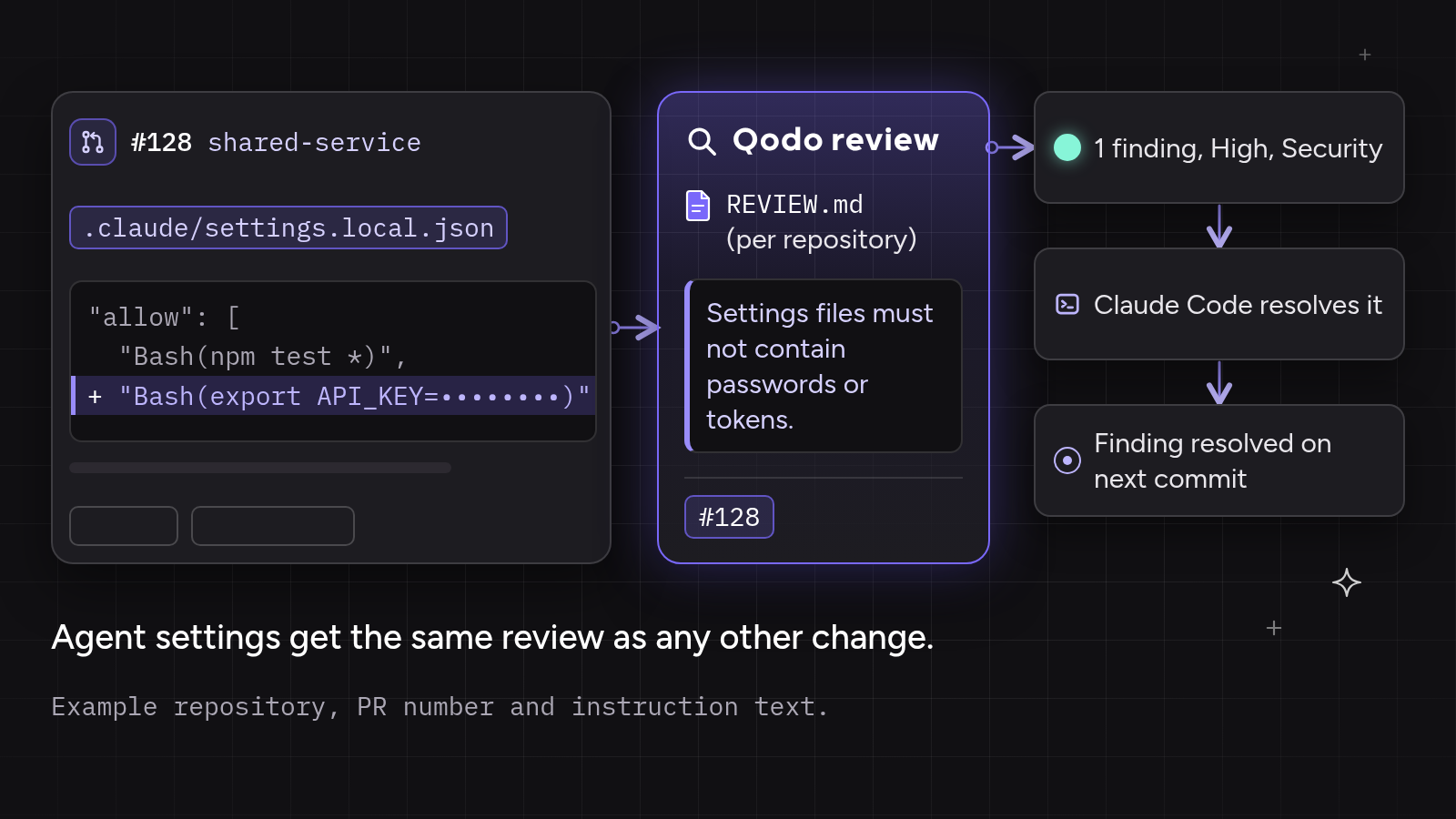
REVIEW.md is a file at the root of a repository that tells Qodo’s review agents what to flag and how to prioritize findings on every PR. A team adds a section for agent settings, naming .claude/, .cursor/ and .gemini/, a committed settings.local.json, and any password, token or connection string inside an allow rule. Qodo uses REVIEW.md only for its code review agents, so the instruction holds whichever coding agent wrote the change.
REVIEW.md instructions are on by default for Qodo SaaS workspaces, and single-tenant and on-premises teams turn them on in the Qodo portal under Configurations > Context.
Custom instructions in the Qodo portal add the same guidance for the Issue finding agent across the organization, applied wherever a repository has no configuration of its own. Enterprise engineering teams get one list of review instructions across many repositories and coding agents.
Qodo Reviews Every PR as It Opens, Settings Files Included
Qodo runs a review automatically when a PR is opened, reopened or marked ready for review, and reads the files the PR changes. A settings file that lands in a commit appears in the review like any other change, before a person merges the PR.
High-velocity teams keep the coding agents they already use and get every PR checked, with setup in about 5 minutes on GitHub or Bitbucket Cloud and no new process.
Qodo Labels Security Findings, and Claude Code Resolves Them
Qodo labels each finding by impact and severity. Qodo’s guide to the anatomy of a review defines the Security label as “Issues that could expose vulnerabilities or sensitive data,” and High severity includes “sensitive data exposure.” Qodo’s Issue finding agent handles bug, security and performance detection, and the team’s instructions tell it which agent settings to treat as code. Each finding explains what needs attention and why, inside the PR.
Review Resolver, an Agentic Toolbox skill in Qodo’s Claude Code plugin, lets Claude Code retrieve Qodo’s findings from an open PR and resolve the ones a developer asks for. Every finding gets an explicit outcome, fixed, skipped with a reason, or reported without changes.
Teams want code review to look for sensitive data in a change, including personal and health data, along with keys and passwords. Secret scanning covers known key formats across a repository and its history, and Qodo adds a review of every settings change against the team’s written instructions. Rotating an exposed credential stays a person’s job.
Analytics and Resolved Findings Show Leaders What Changed
Each time Qodo reviews a new commit, it re-checks every open finding against the changes since the finding was raised, and marks it resolved when the changes address it.
Qodo’s code review analytics shows admins how teams respond to findings across PRs, repositories and PR authors. Leaders filter by the Security category, whose examples include hardcoded secrets, over ranges such as the last 30 or 90 days, and see which high-severity findings remain unaddressed. An instruction file tells an agent what to do. Governance checks outside the agent whether the standard held, and reports how often.
Where Agent Settings Break Down: 2 Examples
Agent settings example 1: a copied settings folder carried a database password
A platform team adopted Claude Code a year earlier and copied its .claude/ folder into each new service by hand. Nobody owned the folder after setup. A developer had once approved a psql command with PGPASSWORD= in it, and the copied settings.local.json had no ignore entry in the new repository.
The team added an agent settings section to the repository’s REVIEW.md, and on the next PR Qodo raised a finding on the committed settings file under that instruction. The developer rotated the password, Claude Code replaced the rule with one that reads $DB_URL through Review Resolver, and Qodo marked the finding resolved when it reviewed the next commit.
Agent settings example 2: a shared settings file picked up a token
A frontend team committed .claude/settings.json on purpose, to share allow rules for build and test commands. A developer approved an npm publish command in the VS Code extension, and the extension saved the exact command, token included, to the shared file.
The repository’s REVIEW.md already named saved commands with tokens, and Qodo raised a finding under that instruction on the PR. The developer revoked the token, Claude Code resolved the finding, and the platform lead filtered analytics by the Security category to check other repositories.
Hands-On: Review Agent Settings Like Code With Qodo and Claude Code
The steps follow Qodo’s docs as of 9 Nov 2026. The instruction text is an example, not a Qodo default.
- Rotate first. Change every password, token and key that any
.claude/settings.local.jsonor.claude/settings.jsonhas ever held, including older versions in Git history. - Keep the local file local. Run
git rm --cached .claude/settings.local.jsonand add the file to the repository’s own.gitignore, as the researchers advise. - Install Qodo on your Git provider. Installation takes about 5 minutes on GitHub and on Bitbucket Cloud, and around 5 to 10 minutes on GitLab and Azure DevOps. Reviews then run automatically when a PR opens.
- Add an agent settings section to
REVIEW.mdat the repository root. Plain Markdown works, with no required schema.
# REVIEW.md

## Agent settings

- Treat changes under .claude/, .cursor/, .gemini/ and .specstory/ as code changes.
- Flag any committed .claude/settings.local.json. The file belongs on one developer's machine.
- Flag any allow rule or saved command that holds a password, token, key or connection string, including values after PGPASSWORD=, sshpass -p or mysql -p.
- Add the same text organization-wide. In the Qodo portal, go to Configurations, then Custom instructions, paste the three lines for the Issue finding agent, and click Save.
- Install Qodo in Claude Code. Go to Claude plugins, open Browse Plugins, search for Qodo, copy the installation command and run it in Claude Code, as the Claude Code plugin guide describes.
- Resolve findings from Claude Code. After Qodo reviews an open PR, ask Claude Code to resolve the findings you choose through Review Resolver.
Resolve the security findings from my pull request.
- Read the record. As an admin, open Analytics in the Qodo portal, choose Last 30 days, filter by the Security category and break the data down by repository or PR author.
Summary
Claude Code’s “Yes, and don’t ask again” can save an approved command, secret included, in .claude/settings.local.json. Apiiro found 1,122 public GitHub copies holding at least one secret, untested for validity, and scanners in its test missed 215 of them.
When every agent asks fewer questions, the answers move into settings files that ship with the code, sit unowned and slip past pattern scanners. Agent settings are code. Qodo reviews every PR against one REVIEW.md per repository and organization-wide instructions, lets Claude Code resolve its findings through Qodo’s plugins, re-checks open findings on every commit and shows leaders the record in analytics.
Teams merge agent-generated code sooner with fewer rollbacks. Enterprise engineering teams get one list of review instructions across many repositories and coding agents. High-velocity teams keep their coding agents, get every PR checked and finish setup in about 5 to 10 minutes on cloud Git providers. Qodo’s guide to reviewing code from Codex and Claude Code and its AI code review guide cover the wider picture.
FAQs
What does “Yes, and don’t ask again” do in Claude Code?
“Yes, and don’t ask again” saves an allow rule in .claude/settings.local.json, so matching commands run without asking in later sessions. The saved rule is sometimes a pattern and sometimes the exact command, and an exact command keeps any password or token typed into it in plain text.
Should .claude/settings.local.json be committed to Git?
.claude/settings.local.json should not be committed to Git. Anthropic’s Boris Cherny wrote that the file “is meant to stay local.” Claude Code adds the file to one computer’s global Git excludes, so teams also add it to each repository’s own .gitignore.
Do secret scanners catch passwords in Claude Code settings files?
Secret scanners catch many of the passwords in Claude Code settings files and miss some. In Apiiro’s test, run without verification, gitleaks flagged 564 of 1,122 files and TruffleHog 643, and neither flagged 215, mostly passwords typed inside commands. Teams keep secret scanning on and review settings changes in each PR.
How do you review changes to agent settings files?
Reviewing agent settings files starts with a written instruction that treats agent folders and saved commands as code. Qodo reviews every PR against the repository’s REVIEW.md and the organization’s custom instructions, and Claude Code can resolve Qodo’s findings through Qodo’s plugin.
What should teams do first after the Claude Code finding?
Teams should rotate every credential any Claude Code settings file has ever held first, then remove .claude/settings.local.json from Git tracking and add it to .gitignore. Older versions stay in Git history and forks, so deleting the file alone does not undo the exposure.
About the author